Chromebook Duet 5 2021 Specs, Features, and Value: Is it worth the price tag?
Category: Electronics
Introduction
The Lenovo Chromebook Duet 5 (2021) arrived as a larger follow-up to the original 10-inch Duet, positioning itself as a compact, convertible Chromebook with a focus on display quality and portability. For buyers who want a tablet-first Chrome OS experience that can double as a light laptop, the Duet 5 promises an attractive mix of a vivid OLED screen, detachable keyboard convenience, and long battery life. This article examines the Duet 5’s key specifications and real-world performance, weighs its pros and cons, compares it to a few relevant alternatives, and offers a buying guide for shoppers deciding whether it represents good value for money.
What the Duet 5 is (and who it’s for)
The Duet 5 is a 2-in-1 Chromebook: a tablet with a detachable keyboard and kickstand-style case that runs Chrome OS. It is aimed at students, frequent travelers, and anyone who prioritizes a lightweight device for web browsing, streaming, productivity in the cloud, and Android apps. Its design favors media consumption and general-purpose productivity more than heavy local content creation or demanding native applications.
Detailed product review and analysis
Design and build
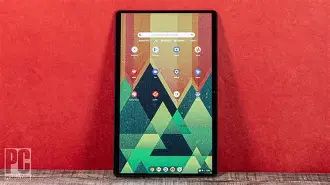
The Duet 5 continues Lenovo’s clean, minimalist convertible design language. The chassis is slim and lightweight for a 13-inch tablet, while the included keyboard folio attaches magnetically and offers a laptop-like typing experience adequate for emails and class notes. The kickstand/tablet form factor makes it comfortable for airplane tray tables and sofa use. Ports are intentionally few to preserve thinness — typically two USB-C ports for charging and data, and in many configurations no traditional headphone jack — so buyers should plan for USB-C or Bluetooth audio.
Display
One of the Duet 5’s headline features is its OLED panel. The 13.3-inch display (16:10 or similar tall aspect in many configurations) delivers deep blacks, high contrast, and saturated colors, making it excellent for streaming movies, editing photos in web apps, or reading documents. For a Chromebook this size, the OLED option is a meaningful upgrade over IPS panels found on most budget Chromebooks — especially for users who care about color accuracy and contrast. That said, OLED can produce richer visuals at the expense of potential burn-in risk on persistent UI elements if a device is used in the same way daily for several years.
Performance and platform
The Duet 5 is powered by an ARM-based processor common to thin-and-light Chromebooks (Qualcomm Snapdragon family variants in many models), paired with 4 GB or 8 GB of RAM and 64 GB or 128 GB of onboard storage. Chrome OS is efficient and works well with modest hardware, so typical web browsing, Google Workspace, video calls, and Android apps run smoothly. However, the platform is not intended for heavy multitasking with dozens of browser tabs or demanding local software. Buyers who need serious local performance for development, large spreadsheets, or virtualization will want a more powerful x86-based Chromebook or traditional laptop.
Battery life and thermals
Battery life is one of the Duet 5’s strengths. In everyday mixed usage — browsing, streaming, and document editing — the tablet can easily last a workday on a single charge. Lenovo’s official estimates vary by configuration and brightness, but users can expect long runtimes under typical conditions thanks to efficient ARM silicon and Chrome OS optimizations. Thermally, the device is passively cooled (no fans), so it stays quiet; sustained heavy loads will throttle performance instead of increasing fan noise.
Keyboard, stylus, and input
The detachable keyboard is thin and convenient but not the deepest-travel typing experience. It is well-suited to emails, essays, and short writing sessions. For extended heavy typing, some will prefer a more traditional laptop keyboard. The Duet 5 supports stylus input through USI-compatible pens in many models, which expands its usefulness for note-taking and light creative tasks. The absence of a built-in active stylus garage on some units means buyers must carry the pen separately.
Looking for the best Electronics deals on Amazon?
Browse Now →Connectivity and cameras
Expect Wi‑Fi 5 or Wi‑Fi 6 depending on SKU, Bluetooth for accessories, and stereo speakers tuned for clear dialogue and good volume. Camera setup is serviceable for video calls; front-facing webcams are optimized for conferencing rather than content creation. Port selection favors USB-C(s) and may include a microSD slot on some regional models for storage expansion.
Software experience
Chrome OS brings fast boot times, automatic updates, built-in virus resistance, and excellent integration with Google services. Android apps from the Play Store and Linux (Beta) support add flexibility. The Duet 5’s OLED screen and form factor make it useful as a multimedia tablet and a lightweight productivity machine, but the Chrome-first environment imposes limits: compatibility with specialized desktop software is constrained and some professional workflows still rely on Windows or macOS apps.
Real-world use cases
- Students: Ideal for note-taking, document editing, online classes, and media consumption. Lightweight portability and long battery life help across a school day.
- Frequent travelers and commuters: The slim tablet plus keyboard combination fits in small bags and is good for on-the-go email and entertainment.
- Home media device: The OLED display and stereo speakers make it a pleasant device for streaming video on the couch.
- Remote workers with cloud-based workflows: Great for Slack, Zoom, Google Meet, and browser-based productivity, but less suited for heavy local compute.
- Casual creators: Works well for basic photo editing in web apps and sketching with a USI stylus, not for professional video editing or 3D work.
Pros & Cons
- Pros:
- Vibrant OLED display with strong contrast and color for media and web design previewing
- Thin, lightweight 2-in-1 design with detachable keyboard for flexible use cases
- Excellent battery life under typical usage
- Quiet, fanless operation and cool running for normal tasks
- Chrome OS simplicity, fast updates, and strong integration with Google services
- Cons:
- Performance limited for demanding local workloads — modest CPU and memory options
- Limited port selection, potential lack of headphone jack on some SKUs
- Keyboard is thin and may not satisfy heavy typists for long sessions
- Storage is often limited (eMMC) without large SSD options; cloud-centric model may not suit everyone
- Potential OLED burn-in risk over many years of static UI use
Comparison table (Duet 5 2021 vs. similar devices)
| Model | Display | Typical CPU | RAM / Storage | Battery | Form Factor | Best for |
|---|---|---|---|---|---|---|
| Lenovo Chromebook Duet 5 (2021) | 13.3" OLED (high contrast, vivid color) | Qualcomm Snapdragon (ARM) | 4–8 GB / 64–128 GB eMMC | Long life (full day use typical) | Detachable 2-in-1 tablet + keyboard | Students, streaming, light productivity |
| Lenovo Chromebook Duet (2020) | 10.1" IPS (smaller, lower res) | MediaTek / lower-power ARM | 4 GB / 64 GB | Very good for smaller tablet | Detachable 2-in-1 (smaller) | Budget buyers needing extreme portability |
| Samsung Galaxy Chromebook 2 | 13.3" QLED/IPS (bright colors) | Intel (x86) | 8 GB / 128 GB SSD | Moderate (depends on model) | Clamshell or convertible (not always detachable) | Users needing stronger x86 compatibility |
Buying guide: What to consider before purchasing
1. Intended use
Buy the Duet 5 if the majority of the work is browser-based, cloud-first, or involves Android apps. For heavy multitasking, software that requires native Windows or macOS apps, or CPU/GPU-intensive tasks, consider a more powerful Chromebook or laptop.
2. Display priorities
If a bright, high-contrast screen is a top priority for streaming and photo review, the Duet 5’s OLED is a clear advantage. If concerned about long-term OLED burn-in or needing maximum brightness for outdoor use, compare IPS-based alternatives.
3. Memory and storage
Choose 8 GB RAM if budget permits — that extra headroom helps with more browser tabs and better multitasking. Storage on many Duet 5 SKUs is limited, and eMMC is slower than NVMe SSDs; plan for cloud storage or pick a configuration with microSD expansion if local files are important.
4. Keyboard and typing comfort
Consider how much typing is required. The included keyboard is fine for short- to medium-length sessions, but buyers who type for many hours per day should test the feel in person or budget for a Bluetooth keyboard.
5. Connectivity needs
Check the SKU’s port list. If frequent wired connections or multiple external displays are required, the minimal ports on a tablet-first device may be limiting. USB‑C hubs or docks are a common workaround.
Looking for the best Electronics deals on Amazon?
View Offers →6. Stylus support
Confirm whether the SKU supports a USI stylus and whether a stylus is included. For digital note-taking or annotation, stylus compatibility is useful; if a pen is not included, factor that additional cost into the purchase.
7. Software updates and longevity
Chromebooks receive automatic updates for a defined period (Automatic Update Expiration date). Check the specific model’s update support timeline to ensure it will receive security and feature updates for an acceptable duration.
8. Price vs. value
Compare the Duet 5’s price to nearby alternatives. If the OLED display and detachable form factor are high-value features for the buyer, a slightly higher price may be justified. If raw performance or local storage is more critical, cheaper or similarly priced devices with x86 chips and SSDs might present better value.
Final verdict — is it worth the price tag?
The Chromebook Duet 5 (2021) is a compelling option for buyers who prioritize a premium display, tablet-first portability, and the simplicity of Chrome OS. It offers a pleasant media experience, long battery life, and enough performance for typical web and cloud-based workflows. For students, light office work, travelers, and content consumers, it can represent strong value — particularly when chosen with 8 GB of RAM and an adequate storage option.
However, potential buyers should not view the Duet 5 as a replacement for a mainstream laptop when it comes to raw performance, local storage speed, or compatibility with professional desktop applications. Its minimal port selection and thin keyboard can be limiting under certain workflows. Ultimately, the Duet 5 is worth the price if the buyer values a high-quality OLED tablet experience in a Chrome OS package and is comfortable with cloud-centric storage and app workflows. For heavier computing needs or a more traditional laptop experience, there are better choices at or near the same price point.
Conclusion
The Lenovo Chromebook Duet 5 (2021) stands out in the Chromebook lineup because of its larger OLED display and convertible tablet form factor. It is well-suited to students, casual creators, frequent flyers, and anyone who prefers a portable, media-friendly device that runs quietly and lasts through long days. Prospective buyers should carefully match their workflow to the Duet 5’s strengths — display quality, portability, and Chrome OS convenience — and weigh trade-offs like limited local performance and ports. When those trade-offs align with a buyer’s priorities, the Duet 5 can be a sensible and enjoyable purchase.